> ## Documentation Index
> Fetch the complete documentation index at: https://rive-migrating-to-data-binding-fixes.mintlify.site/llms.txt
> Use this file to discover all available pages before exploring further.
# Listeners
> Enable listeners on your Rive animation in Unity
For more information on Rive Listeners see the [editor documentation](/editor/state-machine/listeners).
} href="/editor/state-machine/listeners">
Listeners give designers the tools to take their State Machine one step further and define click, hover, and mouse move actions that can change properties in the editor and at runtime without the need for a developer.
[Panel Renderers](/game-runtimes/unity/components#panel-renderers) are responsible for passing pointer input to **Rive Panels.**
**Requirements**
* Set the `Pointer Input Mode` setting on any **Panel Renderer** to `Enable Pointer Input` if you want a **Rive Panel** to receive pointer events.
* Add an **EventSystem** to the scene. This provides input from Unity to the Panel Renderers and allows them to support any input system in Unity (as long as it uses the EventSystem)
* For the **Rive Canvas Renderer**, ensure the parent Canvas has a **Graphics Raycaster** attached.
* For the **Rive Texture Renderer**, ensure the event camera has a **Physics Raycaster** component attached.
The GameObject with the **Rive Texture Renderer** attached must also have a **MeshCollider** attached.
### Hit Testing
Hit testing controls how pointer events interact with **Rive Widgets** and the content behind them. You can configure this behavior using the `Hit Test Behavior` setting on your **Rive Widget**:
* **Opaque**: The widget blocks all pointer events within its bounds, regardless of whether there's an interactive element (listener) at the pointer location. Content behind the widget won't receive any pointer events.
* **Translucent**: The widget only blocks pointer events where there's an interactive element (listener) at the pointer location. If no listener is hit, the event passes through to content behind the widget.
* **Transparent**: All pointer events pass through to content behind the widget, but Rive listeners still detect and respond to pointer events. This allows simultaneous interaction with both the widget and background content.
* **None**: The widget doesn't perform any hit testing and ignores all pointer events.
This flexibility allows you to create layered interactive experiences while controlling precisely how pointer events are handled at each layer.
Using the low-level API is no longer recommended. Please use the [Component API](/game-runtimes/unity/components) instead for ease of use and maintainability. This content is provided for legacy support only.
## Pointer Positions
In rive-unity pointer (mouse/touch) events can be passed to an artboard to enable Rive Listeners. This is accomplished by translating the pointer position to an artboard's local coordinate.
For a complete example see the **getting-started** project in the [examples repository](https://github.com/rive-app/rive-unity-examples) and open a sample scenes:
* **DrawToCameraScene**: Pointer events on a camera
* **DrawToCubeScene**: Pointer events on a mesh
#### Camera Hit Test
See the **DrawToCameraScene** scene in the **getting-started** project from the [example repository](https://github.com/rive-app/rive-unity-examples).
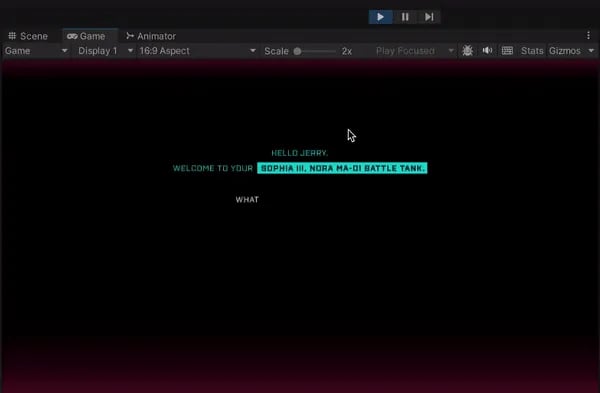 This code snippet demonstrates translating mouse position on the camera to an artboard.
```csharp theme={null}
private Artboard m_artboard;
private StateMachine m_stateMachine;
...
Camera camera = gameObject.GetComponent();
if (camera != null)
{
Vector3 mousePos = camera.ScreenToViewportPoint(Input.mousePosition);
Vector2 mouseRiveScreenPos = new Vector2(
mousePos.x * camera.pixelWidth,
(1 - mousePos.y) * camera.pixelHeight
);
if (m_artboard != null && m_lastMousePosition != mouseRiveScreenPos)
{
Vector2 local = m_artboard.LocalCoordinate(
mouseRiveScreenPos,
new Rect(0, 0, camera.pixelWidth, camera.pixelHeight),
fit,
alignment
);
m_stateMachine?.PointerMove(local);
m_lastMousePosition = mouseRiveScreenPos;
}
if (Input.GetMouseButtonDown(0))
{
Vector2 local = m_artboard.LocalCoordinate(
mouseRiveScreenPos,
new Rect(0, 0, camera.pixelWidth, camera.pixelHeight),
fit,
alignment
);
m_stateMachine?.PointerDown(local);
m_wasMouseDown = true;
}
else if (m_wasMouseDown)
{
m_wasMouseDown = false;
Vector2 local = m_artboard.LocalCoordinate(
mouseRiveScreenPos,
new Rect(0, 0, camera.pixelWidth, camera.pixelHeight),
fit,
alignment
);
m_stateMachine?.PointerUp(local);
}
}
```
#### Mesh Hit Test
See the **DrawToCubeScene** scene in the **getting-started** project from the [example repository](https://github.com/rive-app/rive-unity-examples)
This code snippet demonstrates translating mouse position on the camera to an artboard.
```csharp theme={null}
private Artboard m_artboard;
private StateMachine m_stateMachine;
...
Camera camera = gameObject.GetComponent();
if (camera != null)
{
Vector3 mousePos = camera.ScreenToViewportPoint(Input.mousePosition);
Vector2 mouseRiveScreenPos = new Vector2(
mousePos.x * camera.pixelWidth,
(1 - mousePos.y) * camera.pixelHeight
);
if (m_artboard != null && m_lastMousePosition != mouseRiveScreenPos)
{
Vector2 local = m_artboard.LocalCoordinate(
mouseRiveScreenPos,
new Rect(0, 0, camera.pixelWidth, camera.pixelHeight),
fit,
alignment
);
m_stateMachine?.PointerMove(local);
m_lastMousePosition = mouseRiveScreenPos;
}
if (Input.GetMouseButtonDown(0))
{
Vector2 local = m_artboard.LocalCoordinate(
mouseRiveScreenPos,
new Rect(0, 0, camera.pixelWidth, camera.pixelHeight),
fit,
alignment
);
m_stateMachine?.PointerDown(local);
m_wasMouseDown = true;
}
else if (m_wasMouseDown)
{
m_wasMouseDown = false;
Vector2 local = m_artboard.LocalCoordinate(
mouseRiveScreenPos,
new Rect(0, 0, camera.pixelWidth, camera.pixelHeight),
fit,
alignment
);
m_stateMachine?.PointerUp(local);
}
}
```
#### Mesh Hit Test
See the **DrawToCubeScene** scene in the **getting-started** project from the [example repository](https://github.com/rive-app/rive-unity-examples)
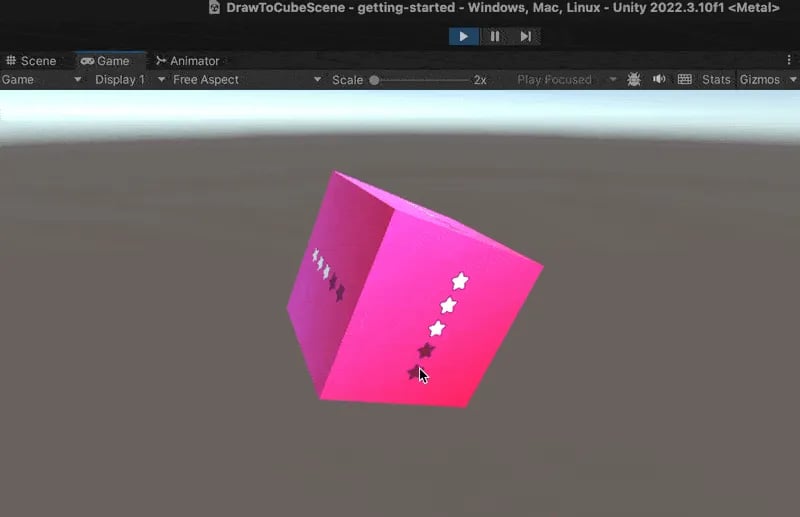 This code snippet demonstrates translating a [RaycastHit](https://docs.unity3d.com/ScriptReference/RaycastHit.html) on an object to an artboard's local coordinates.
The **GameObject** must have a **MeshCollider** attached.
```csharp theme={null}
void HitTesting()
{
Camera camera = Camera.main;
if (camera == null || renderTexture == null || m_artboard == null) return;
if (!Physics.Raycast(camera.ScreenPointToRay(Input.mousePosition), out RaycastHit hit))
return;
Renderer rend = hit.transform.GetComponent();
MeshCollider meshCollider = hit.collider as MeshCollider;
if (rend == null || rend.sharedMaterial == null || rend.sharedMaterial.mainTexture == null || meshCollider == null)
return;
Vector2 pixelUV = hit.textureCoord;
pixelUV.x *= renderTexture.width;
pixelUV.y *= renderTexture.height;
Vector3 mousePos = camera.ScreenToViewportPoint(Input.mousePosition);
Vector2 mouseRiveScreenPos = new(mousePos.x * camera.pixelWidth, (1 - mousePos.y) * camera.pixelHeight);
if (m_lastMousePosition != mouseRiveScreenPos || transform.hasChanged)
{
Vector2 local = m_artboard.LocalCoordinate(pixelUV, new Rect(0, 0, renderTexture.width, renderTexture.height), fit, alignment);
m_stateMachine?.PointerMove(local);
m_lastMousePosition = mouseRiveScreenPos;
}
if (Input.GetMouseButtonDown(0))
{
Vector2 local = m_artboard.LocalCoordinate(pixelUV, new Rect(0, 0, renderTexture.width, renderTexture.height), fit, alignment);
m_stateMachine?.PointerDown(local);
m_wasMouseDown = true;
}
else if (m_wasMouseDown)
{
m_wasMouseDown = false; Vector2 local = m_artboard.LocalCoordinate(mouseRiveScreenPos, new Rect(0, 0, renderTexture.width, renderTexture.height), fit, alignment);
m_stateMachine?.PointerUp(local);
}
}
```
This code snippet demonstrates translating a [RaycastHit](https://docs.unity3d.com/ScriptReference/RaycastHit.html) on an object to an artboard's local coordinates.
The **GameObject** must have a **MeshCollider** attached.
```csharp theme={null}
void HitTesting()
{
Camera camera = Camera.main;
if (camera == null || renderTexture == null || m_artboard == null) return;
if (!Physics.Raycast(camera.ScreenPointToRay(Input.mousePosition), out RaycastHit hit))
return;
Renderer rend = hit.transform.GetComponent();
MeshCollider meshCollider = hit.collider as MeshCollider;
if (rend == null || rend.sharedMaterial == null || rend.sharedMaterial.mainTexture == null || meshCollider == null)
return;
Vector2 pixelUV = hit.textureCoord;
pixelUV.x *= renderTexture.width;
pixelUV.y *= renderTexture.height;
Vector3 mousePos = camera.ScreenToViewportPoint(Input.mousePosition);
Vector2 mouseRiveScreenPos = new(mousePos.x * camera.pixelWidth, (1 - mousePos.y) * camera.pixelHeight);
if (m_lastMousePosition != mouseRiveScreenPos || transform.hasChanged)
{
Vector2 local = m_artboard.LocalCoordinate(pixelUV, new Rect(0, 0, renderTexture.width, renderTexture.height), fit, alignment);
m_stateMachine?.PointerMove(local);
m_lastMousePosition = mouseRiveScreenPos;
}
if (Input.GetMouseButtonDown(0))
{
Vector2 local = m_artboard.LocalCoordinate(pixelUV, new Rect(0, 0, renderTexture.width, renderTexture.height), fit, alignment);
m_stateMachine?.PointerDown(local);
m_wasMouseDown = true;
}
else if (m_wasMouseDown)
{
m_wasMouseDown = false; Vector2 local = m_artboard.LocalCoordinate(mouseRiveScreenPos, new Rect(0, 0, renderTexture.width, renderTexture.height), fit, alignment);
m_stateMachine?.PointerUp(local);
}
}
```